



Business growth often brings challenges that are difficult to manage with traditional tools. What begins with a few spreadsheets and basic software applications can gradually become a complicated network of disconnected systems, repeated tasks, and delayed decisions. For small businesses, these operational gaps can consume valuable time, increase administrative work, and affect productivity.
As customer demands increase and business processes become more complex, having accurate information available across departments becomes essential. However, managing sales, inventory, finances, and employee activities through separate systems can create unnecessary confusion.
This is where Custom ERP Solutions play an important role. By bringing essential business functions together on a centralized platform, custom ERP software helps small businesses simplify workflows, improve coordination, and gain better visibility into daily operations.
What Makes Custom ERP Solutions Different?
Enterprise Resource Planning (ERP) software connects business functions, including accounting, inventory, purchasing, sales, and human resource management.
While ready-made ERP applications offer predefined features, Custom ERP Solutions allow businesses to select functionalities based on their operational requirements.
For example, a manufacturing company may require production scheduling and raw material tracking, while a service-based business may prioritize project management, employee allocation, and billing.
Through Custom ERP Software Development, businesses can create a centralized system that supports existing workflows, connects business applications, and accommodates future operational requirements.
Why Are Custom ERP Solutions Important for Small Businesses?
1. Reduces Dependency on Individual Employees
Important operational information is often handled by specific employees. Their absence can make it difficult to access records or complete pending activities.
Custom ERP software maintains centralized records, transaction histories, and documented workflows, allowing authorized employees to continue essential operations.
2. Brings Consistency to Business Processes
Different departments may follow different procedures for completing similar tasks, creating confusion during purchasing, billing, and order processing.
Custom ERP systems introduce standardized workflows, approval procedures, and reporting formats, helping businesses maintain consistency across departments.
3. Simplifies Vendor and Supplier Management
Managing suppliers involves tracking quotations, purchase orders, delivery schedules, invoices, and payment terms.
Custom ERP Solutions organize supplier information and connect purchasing activities with inventory and financial records, improving visibility into procurement operations.
4. Improves Accountability Across Departments
Without a centralized system, identifying who approved a transaction or completed a particular activity can be difficult.
ERP applications can incorporate role-based permissions, approval histories, and activity tracking, allowing managers to monitor responsibilities and identify operational delays.
5. Helps Businesses Prepare for Seasonal Demand
Customer demand often changes during holidays, promotional campaigns, and seasonal periods.
ERP reporting tools help businesses review historical sales patterns, inventory movements, and purchasing trends to plan resources according to expected demand.
6. Reduces Delays Caused by Manual Approvals
Routine activities such as purchase requests and expense approvals often require authorization.
Through professional ERP development services, businesses can introduce automated workflows, notifications, and status tracking to reduce unnecessary delays.
7. Supports Better Data Security and Access Management
Small businesses manage sensitive financial, customer, and employee information.
Custom ERP systems can incorporate authentication features, access permissions, and audit logs to help businesses manage information access according to employee responsibilities.
How Custom ERP Solutions Help Small Businesses Make Better Decisions
Business decisions depend on accurate and accessible information. However, collecting information from different applications can delay important decisions.
Custom ERP Solutions bring relevant operational data together through centralized dashboards and reports.
For example, business owners can compare purchasing costs, analyze order fulfillment trends, and identify products experiencing consistent demand.
These insights help management make decisions based on actual business information rather than assumptions.
Custom ERP Solutions and Customer Experience: What’s the Connection?
Customer satisfaction depends on accurate order processing, timely communication, and consistent service.
Custom ERP software can connect customer information, order histories, billing records, and fulfillment details.
Employees can access relevant information without repeatedly contacting other departments.
This supports faster responses to customer inquiries, fewer order-related misunderstandings, and better coordination during service delivery.
Signs Your Small Business Needs a Custom ERP System
Not every small business requires custom ERP software immediately. However, recurring operational difficulties may indicate that existing applications are no longer meeting business needs.
- Repeated Data Entry: Employees enter identical information into multiple applications.
- Reporting Difficulties: Management spends excessive time collecting and verifying information.
- Disconnected Departments: Teams maintain separate records that require frequent manual updates.
- Limited Software Flexibility: Existing applications cannot accommodate changing business requirements.
- Operational Delays: Manual approvals and information sharing slow down essential activities.
If these challenges occur regularly, evaluating Custom ERP Solutions may help identify opportunities for operational improvement.
Can Custom ERP Software Work with Existing Business Applications?
Replacing every existing application is not always necessary when implementing an ERP system.
Many small businesses already depend on accounting platforms, CRM applications, payment gateways, and e-commerce systems.
Through professional ERP development services, custom ERP applications can be connected with compatible existing software using APIs and other integration methods.
For example, an ERP system may receive confirmed orders from an e-commerce platform and update inventory records accordingly.
Integration requirements should be evaluated during planning to identify technical compatibility, data synchronization needs, and potential limitations.
Cloud-Based vs. On-Premises ERP: Which Is Better?
Choosing the right hosting environment is an important part of Custom ERP Software Development.
Cloud-Based ERP: The application operates on cloud infrastructure, allowing authorized employees to access business information across different locations. Businesses should consider hosting costs, internet connectivity, and security responsibilities.
On-Premise ERP: The application operates on infrastructure managed by the business. This approach provides greater direct control over the hosting environment but generally requires internal technical resources for maintenance and updates.
The appropriate option depends on operational requirements, available resources, budget, and data management policies.
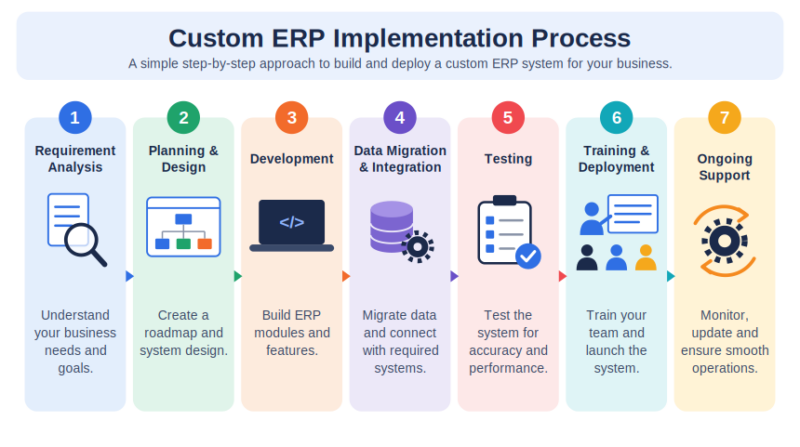
Custom ERP Implementation Process: Step by Step
A structured implementation process helps businesses introduce ERP software while minimizing operational disruptions.
Step 1: Business Requirement Analysis
Identify existing workflows, operational challenges, and business objectives. Determine the modules and functionalities required.
Step 2: ERP Planning and System Design
Prepare a development roadmap covering system architecture, integrations, security requirements, and implementation timelines.
Step 3: Custom ERP Software Development
Develop ERP modules, dashboards, automated workflows, and reporting features based on the approved requirements.
Step 4: Data Migration and System Integration
Clean, validate, and transfer existing business information. Connect the ERP system with relevant third-party applications.
Step 5: Testing and Quality Assurance
Conduct functional, integration, security, and performance testing to verify that the system meets operational requirements.
Step 6: Employee Training and Deployment
Train employees on ERP features and introduce the system through a phased rollout or full deployment.
Step 7: Post-Implementation Support
Monitor system performance, resolve technical issues, and introduce necessary updates as business requirements change.
How to Measure the Success of Custom ERP Implementation
Implementing ERP software is only the beginning. Businesses should evaluate its effectiveness through measurable operational improvements.
Important performance indicators include:
- Order Processing Time: Track the time required to complete customer orders.
- Data Accuracy: Monitor reductions in duplicate records and manual errors.
- Employee Productivity: Measure time spent on repetitive administrative activities.
- Inventory Accuracy: Compare recorded inventory with actual stock.
- Reporting Efficiency: Evaluate how quickly management reports are generated.
- System Adoption: Monitor how consistently employees use the ERP platform.
Comparing these indicators before and after implementation helps businesses understand the value of their ERP investment.
Common Mistakes to Avoid During ERP Implementation
ERP implementation requires careful planning and coordination.
Common mistakes include developing too many features initially, overlooking employee training, underestimating data migration requirements, and failing to establish clear project priorities.
Professional ERP consulting services can help businesses evaluate operational requirements and create a practical implementation roadmap.
Working with an experienced ERP implementation company can also support system integration, testing, deployment, and ongoing maintenance.
Understanding the Long-Term Cost of Custom ERP Software
The cost of ERP development involves more than the initial software development expense.
Businesses should also consider data migration, infrastructure, employee training, maintenance, security updates, and future modifications.
An experienced ERP Software Provider can help organizations assess these requirements before development begins.
Instead of focusing only on initial expenses, businesses should evaluate the total cost of ownership alongside expected operational improvements.
How Custom ERP Solutions Support Long-Term Business Growth
As businesses expand, they may introduce new products, hire additional employees, or establish operations across multiple locations.
Custom ERP applications can accommodate these requirements through additional modules, integrations, and updated workflows.
With appropriate system architecture, maintenance, and technical support, businesses can maintain an ERP platform that continues to support their changing operational needs.
Simplify Your Business Operations With Vidushi Infotech
Disconnected systems, repetitive manual tasks, and limited operational visibility can create unnecessary challenges for growing businesses.
At Vidushi Infotech, we provide Custom ERP Solutions, ERP consulting services, and Custom ERP Software Development to help businesses create applications aligned with their operational requirements.
From understanding business processes to developing integrated ERP systems, our team can help you build a centralized platform that supports better coordination, productivity, and long-term growth.
Ready to bring your business processes together with a custom ERP system?
Connect With Vidushi Infotech for Custom ERP Development Services Today!
Frequently Asked Questions About Custom ERP Solutions
Not necessarily. Depending on the hosting arrangement and support agreement, your ERP development partner can handle technical maintenance, updates, and troubleshooting. However, having an internal employee coordinate system-related requests can be helpful.
Yes. Custom ERP Solutions can support multiple business entities within one platform, with separate financial records, user permissions, and reporting structures. The required functionality should be defined during development.
Yes. Custom ERP software can include reports based on your preferred metrics, departmental activities, and management requirements. You can also request automated reports and dashboards for frequently monitored information.
Yes. Custom ERP applications can be developed to handle multiple currencies, tax calculations, and region-specific reporting requirements. These features are particularly useful for businesses operating across different markets.
The recovery process depends on the system’s hosting setup, backup arrangements, and disaster recovery plan. Your ERP Software Provider should explain the available recovery procedures and support response times before deployment.
You can ask an ERP implementation company for a consultation, relevant product demonstration, or proof of concept. For fully custom systems, a working prototype may require a separate discovery or development phase.


